Sheet metal & fabrication

Printable Cone Template & Calculator

Make a printable cone template online: a full or truncated cone, a paper cone with a glue tab or a sheet metal part. Enter the diameters and height — get the flat pattern with all dimensions and print it 1:1 as PDF, SVG or DXF.

How it works
  • Full and truncated cone
  • Flat pattern with radii, angle and arc length
  • Glue tab or seam allowance
  • Metal thickness taken into account
  • 1:1 PDF tiled to A4 or Letter, SVG and DXF
  • Check the cone in 3D

What the cone generator can do

Flat pattern with dimensions

Flat pattern with dimensions

The slant height, outer and inner radius, sector angle and arc length are shown next to the drawing — enough to draw the pattern by hand with a compass.

Truncated cone (frustum)

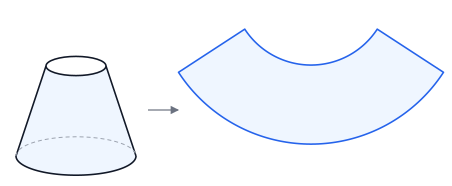
Truncated cone (frustum)

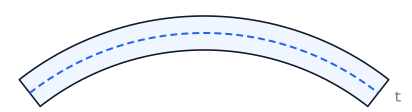
Enter a top diameter and you get a ring-shaped sector for a reducer, a hopper, a lampshade or a bucket. For a full cone leave the top at 0.

DXF for laser and plasma

DXF for laser and plasma

Export the flat pattern as DXF or SVG at true size for a laser, plasma or plotter, or open it in CAD.

Check it in 3D

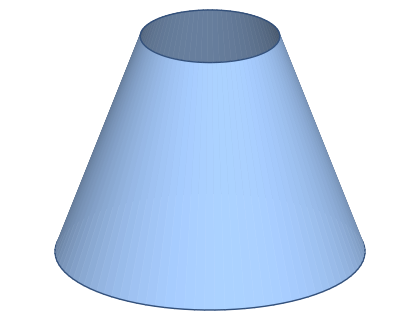
Check it in 3D

Turn the finished cone in 3D before you cut — the easiest way to see that the sizes are what you meant.

Paper cone with a glue tab

Paper cone with a glue tab

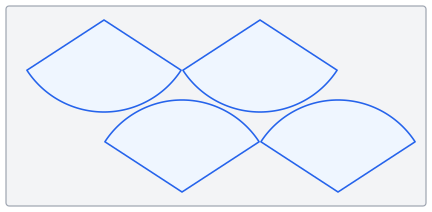
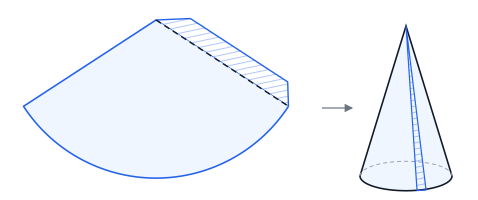
Set a seam allowance and the pattern gets a strip along one edge with a dashed fold line — glue it under the other edge. Large patterns are split across A4 or Letter sheets with glue strips and alignment marks.

Sheet metal thickness

Sheet metal thickness

Enter the thickness and the surface your sizes were measured on: inside, outside or middle. The pattern is developed on the middle line of the sheet (the neutral axis), so the rolled cone comes out to size.

How to make a cone template

1

Enter the cone

Set the base diameter, the top diameter (0 for a full cone) and the height, in mm or inches.

2

Check the pattern

The flat pattern, slant height, sector angle and radii update as you type. The 3D view shows the finished cone.

3

Print, cut and roll

Print the PDF at 100% scale, cut along the outline, roll the sector and join the edges: glue the tab for paper, weld or rivet for metal.

How it is calculated

How to calculate a cone flat pattern

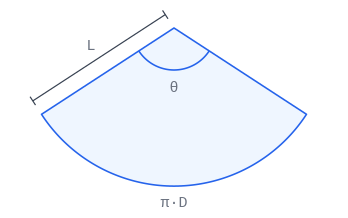
A cone unrolls into a sector of a circle. Everything comes from two numbers: the base diameter and the height. The numbers below follow the calculator — now a cone with base 100.00 mm and height 150.00 mm.

Slant height — the radius of the pattern

The slant height is the length of the cone side from the tip to the edge of the base. It is the long side of a right triangle whose other sides are the height and the base radius: L = √(h² + R²). With R = 50.00 mm and h = 150.00 mm that is L = 158.11 mm.

When the cone is unrolled, the slant height becomes the radius of the sector.
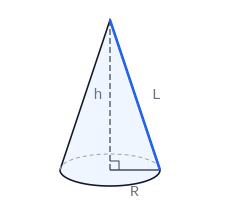
Slant height — the radius of the pattern

Sector angle

The arc of the sector — the stretchout — must be exactly as long as the base circle: arc = π × D = 314.16 mm. A full circle of radius L is 2πL long, so the sector takes the share R ÷ L of it: θ = 360° × R ÷ L = 113.84°.

A tall, narrow cone gives a thin sector; a flat cone gives almost a full circle.
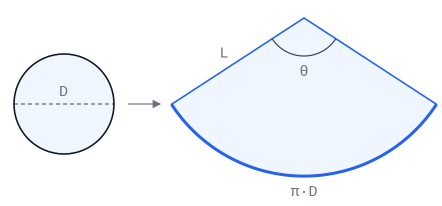
Sector angle

Truncated cone

A truncated cone is a full cone with its tip cut off, so its pattern is a ring-shaped sector. With base radius R, top radius r and height h: side length l = √(h² + (R − r)²), outer radius R × l ÷ (R − r), inner radius r × l ÷ (R − r), angle θ = 360° × (R − r) ÷ l.

For example, base 200 mm, top 100 mm, height 150 mm: l = 158.11 mm, outer radius 316.23 mm, inner radius 158.11 mm, angle 113.84°.
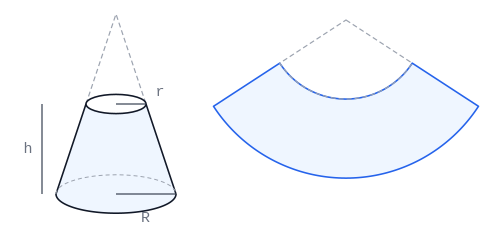
Truncated cone

Drawing it by hand

Draw an arc with radius L from a centre point. Set out the angle θ with a protractor or, more precisely, measure the chord between the ends of the arc: chord = 2 × L × sin(θ ÷ 2) = 264.97 mm. Join both ends to the centre. For a truncated cone draw the inner arc from the same centre.
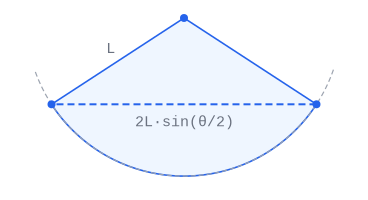
Drawing it by hand

Sheet metal thickness

Paper and thin sheet roll without changing size. Thick metal stretches on the outside of the bend and compresses on the inside, so the pattern is developed on the middle line of the sheet — the neutral axis. Enter the thickness and say whether your diameters are inside, outside or middle — the calculator moves them to the middle line.

Frequently asked questions

A cone development (or flat pattern) is the shape you get when you unroll a cone onto a flat surface. It is always a sector — a pie-slice cut from a circle. The radius of the sector equals the slant height of the cone and the arc length equals the circumference of the base.

Enter a non-zero value in the Top diameter field. The calculator will produce an annular sector — a sector with an inner cutout corresponding to the cone apex that was removed.

The Pages needed chip in the action bar shows the required page count. Large developments are automatically tiled across multiple A4 sheets with a 10 mm overlap. Print each page at 100% scale (do not scale to fit).

Both the PDF and SVG exports are always at 1:1 physical scale. The on-screen preview is scaled to fit your window and is not to scale.

Yes. The exported SVG uses mm units and contains only the outline path. Import it into your CAM software or upload directly to an online cutting service.

Enter the cone sizes, set Seam allowance to 8–10 mm and print the PDF at 100%. Cut along the outer line, fold the tab along the dashed line, roll the sector and glue the tab under the other edge. Card of 160–250 g/m² holds the shape well.

Take the slant height and sector angle from the calculator. Draw an arc with the slant height as radius, mark the chord 2 × L × sin(θ ÷ 2) on it and join both ends to the centre. For a truncated cone add the inner arc with the inner radius from the same centre.

θ = 360° × R ÷ L, where R is the base radius and L the slant height, L = √(h² + R²). For a truncated cone: θ = 360° × (R − r) ÷ l, where l = √(h² + (R − r)²).

Need a different template or some help?

Tell us what you are making — we will help or build the tool you need. No account needed.